Thoscan: A Gothic Typeface for Bold Web Designs
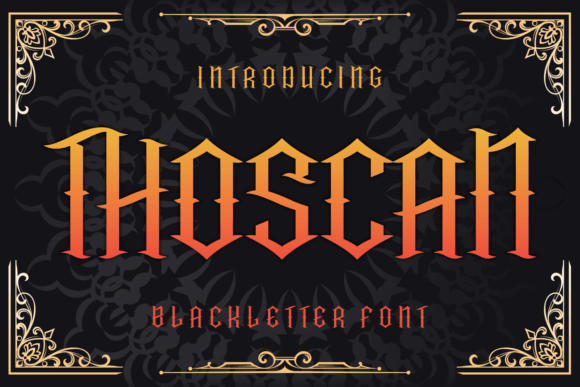
I was working on a boutique website for a vintage-inspired clothing brand when I stumbled upon Thoscan. It was the perfect moment—just as I needed a display font that would command attention without overwhelming the design. Thoscan is a powerful blackletter typeface, and after testing it in real web layouts, I can confidently say it brings a unique flair to digital projects with a vintage or gothic theme.
Blackletter fonts are often seen as ornate and complex, but Thoscan manages to balance that intricacy with readability. The bold and intricate letters draw attention, making it ideal for hero sections, landing page headlines, and call-to-action areas. It’s not just about aesthetics; it’s about how well the font performs in different contexts, especially on responsive websites where every pixel counts.
Elevating Brand Identity with Thoscan
For the boutique site I was designing, the client wanted a strong visual identity that reflected their love for vintage fashion. Thoscan fit perfectly into this vision. When placed over an image banner or used in a hero section, it created a striking contrast against both dark and light backgrounds. Its rich, decorative style helped establish a sense of character and history, which aligned perfectly with the brand’s ethos.
I experimented with using Thoscan in various sections of the site. On the homepage, it worked beautifully as a headline above a full-screen image of a retro dress. On mobile, it scaled down gracefully, maintaining its bold presence without becoming too dense. For smaller buttons or links, however, I knew it wasn’t the right choice—it was more suited for short phrases and titles than long body copy.
Practical Use Cases for Thoscan in Web Design
Thoscan shines in scenarios where you want to make a statement. Think of it as the go-to font for creative portfolio sites, coaching websites, or product landing pages that need a touch of elegance and drama. It works particularly well with image overlays, adding depth and texture to your design.
One of the most effective uses I found was pairing Thoscan with a clean sans serif font for body text. This combination struck the right balance between decorative and functional. The blackletter font became the eye-catching headline, while the sans serif handled the rest of the content, ensuring the user experience remained smooth and readable.
It also looked great in blog headers and campaign landing pages. When used sparingly, it added a layer of sophistication without detracting from the overall message. However, I made sure not to overuse it—too much of anything can dilute the impact.
Considerations for Using Thoscan on the Web
While Thoscan is visually compelling, it’s important to consider its limitations. It’s not suitable for long paragraphs or small navigation text. The complexity of the letters can reduce legibility at smaller sizes, especially on mobile devices. For accessibility reasons, it’s best reserved for decorative use rather than primary content.
Before implementing Thoscan on any website, I always check the available styles, weights, and file formats. Ensuring that the font supports multilingual characters and has proper webfont availability is crucial, especially if the site caters to a global audience. Also, verifying commercial font licensing is essential if you’re planning to use it on client projects, online stores, or branded assets.
Another consideration is performance. While Thoscan adds visual appeal, it can affect loading times if not optimized properly. I recommend using tools like Google Fonts or Font Awesome to host the font efficiently and ensure fast-loading visual content.
Final Thoughts on Thoscan for Digital Projects
Overall, Thoscan is a versatile and impactful blackletter typeface that can elevate the look of any website with a vintage or gothic theme. Whether you're designing a creative portfolio, a boutique online store, or a promotional landing page, it offers a unique way to express your brand’s personality.
As a web designer, I’ve found that using Thoscan thoughtfully—pairing it with simpler fonts and using it only where it can shine—makes all the difference. It’s not just about choosing the right font; it’s about knowing when and how to use it effectively to enhance the user experience and reinforce your brand identity.
If you're looking for a display font that adds character and charm to your web designs, give Thoscan a try. It might just be the missing piece your project needs to stand out in a crowded digital landscape.